
Industry Insights
Engineering Change Request Workflow: A Complete Guide
Published on July 2nd, 2026
How High-Performing Manufacturers Reduce Errors, Improve Accountability, and Keep Engineering Changes Moving
Engineering Changes Rarely Fail Because of Engineering
Every manufacturer eventually discovers the same painful truth: engineering changes rarely fail because the engineering itself is wrong. They fail because information doesn’t reach the right people at the right time.
An outdated drawing is used on the production floor. Purchasing orders obsolete parts. Quality inspects against an old specification. Suppliers receive conflicting revisions. Production continues while approvals sit in someone’s inbox.
The engineering decision may have been correct, but the operational process failed. That’s why an effective Engineering Change Request (ECR) workflow is about much more than documenting change. It’s about controlling how change moves through an organization.
What Is an Engineering Change Request (ECR)?
An Engineering Change Request (ECR) is the formal process used to propose, review, evaluate, and approve changes to products, drawings, specifications, manufacturing processes, or supporting documentation.
An ECR ensures that every proposed change is evaluated, reviewed by the appropriate stakeholders, properly approved, communicated to affected teams, documented for future reference, and implemented in a controlled manner.
Without a structured workflow, engineering changes often become email conversations rather than governed business processes.
Why Engineering Change Workflows Matter
Every engineering change has operational consequences.
A single design modification may affect:
- Engineering
- Manufacturing
- Quality
- Purchasing
- Inventory
- Suppliers
- Customer Support
- Regulatory Compliance
The larger the organization, the greater the complexity. That’s why high-performing manufacturers treat engineering changes as cross-functional operational workflows rather than isolated engineering tasks.
Signs Your Current ECR Process Is Breaking Down
Many organizations already have an engineering change process. The problem is that it’s often held together by email, shared drives, paper approvals, Excel spreadsheets, informal conversations, and tribal knowledge.
Warning signs include:
- Multiple versions of engineering drawings
- Delayed approvals
- Difficulty identifying document owners
- Poor visibility into approval status
- Production using outdated documentation
- Manual follow-up with reviewers
- Missing audit history
- Engineering changes that stall without explanation
These are not document problems. They are operational control problems.
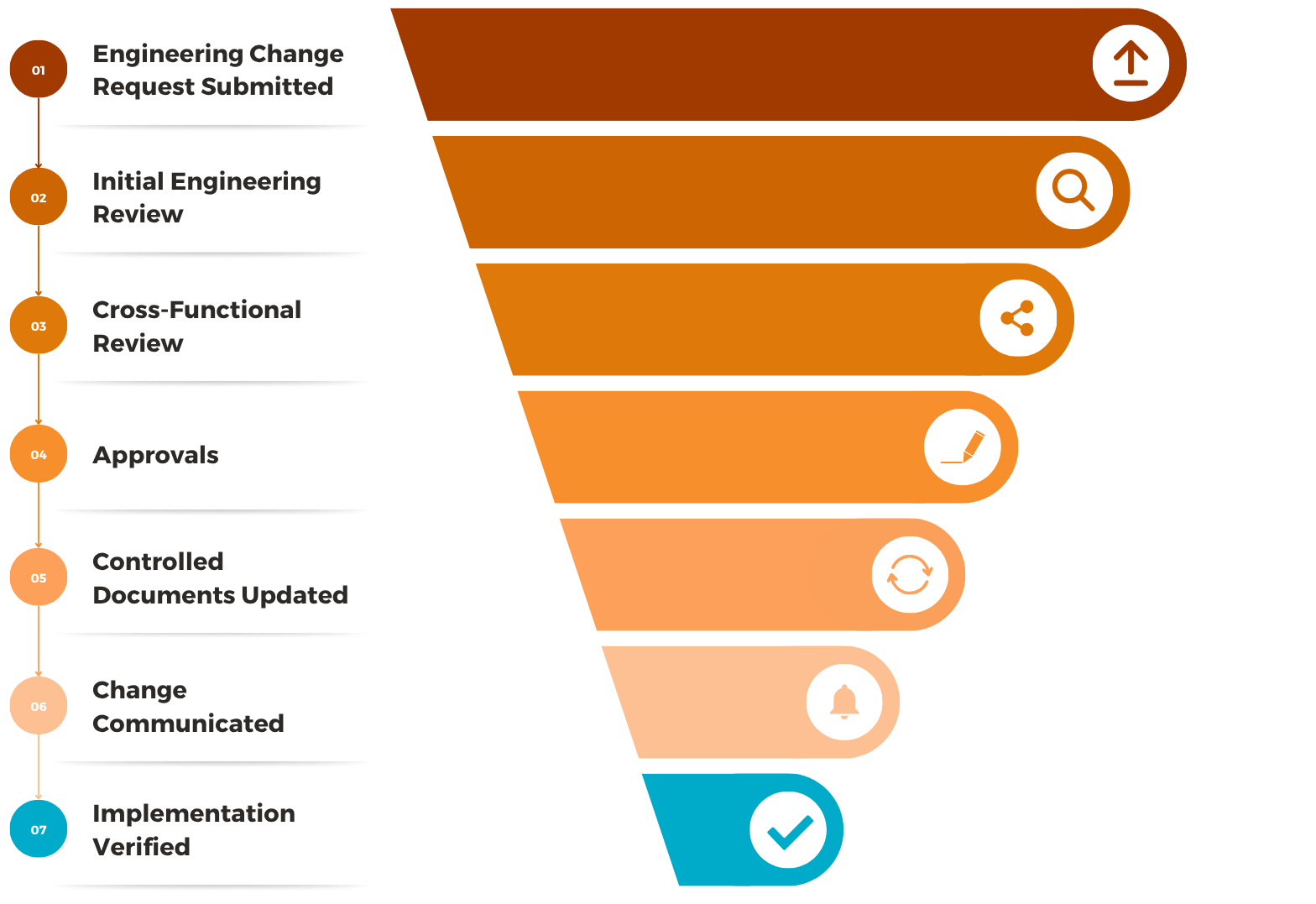
A Modern Engineering Change Request Workflow
High-performing organizations use structured workflows that create accountability at every stage.
Step 1 — Submit the Engineering Change Request
Every change begins with a formal request. Typical information includes the description of the change, business justification, affected products, affected drawings, affected parts, priority, and supporting documentation.
The goal is consistency. Every request begins with complete information.
↓
Step 2 — Initial Engineering Review
During the initial review, engineering validates technical feasibility, design impact, affected assemblies, related documentation, and implementation complexity.
Requests that lack sufficient information are returned before additional departments become involved.
↓
Step 3 — Cross-Functional Review
This is where many organizations struggle. Engineering changes often affect multiple departments, including Manufacturing, Quality, Purchasing, Supply Chain, Production, Regulatory, and Operations.
Each team evaluates the operational impact before approval.
↓
Step 4 — Approval
Once reviews are complete, authorized approvers formally approve the change. Approval records should capture the approver, date, version, comments, and any conditions associated with the approval.
Approvals should never exist solely within email. They become part of the operational record.
↓
Step 5 — Update Controlled Documents
Approved changes trigger updates to engineering drawings, bills of materials, work instructions, SOPs, inspection procedures, and manufacturing documentation.
This step is often overlooked. Updating the drawing without updating supporting documents creates new operational risk.
↓
Step 6 — Communicate the Change
Approved information must reach Production, Quality, Purchasing, Suppliers, Service teams, and, when required, customers.
Successful organizations do not assume people will discover changes. They deliberately distribute them.
↓
Step 7 — Verify Implementation
Finally, organizations verify that the approved change has actually been implemented. Verification activities may include production confirmation, supplier acknowledgement, document revision verification, training completion, and quality validation.
Only then is the workflow considered complete.
A Typical Engineering Change Workflow
Every step creates accountability, and every decision becomes part of the operational record.
An engineering change isn’t complete when it’s approved. It’s complete when every affected person is working from the correct information. That’s the difference between documenting change and controlling change.
Common Mistakes Organizations Make
Treating Engineering Changes as Engineering Projects
Engineering creates the change. Operations implements the change. Both must participate.
Managing Approvals Through Email
Email provides communication. It does not provide governance. Organizations quickly lose visibility into who approved a change, which version was approved, when approval occurred, and what changed.
Updating Drawings But Not Processes
Engineering drawings are only one part of operational change. Supporting procedures, inspections, training materials, and quality documentation often require updates as well.
No Visibility Into Status
Many engineering managers spend more time chasing approvals than evaluating changes. Workflow visibility eliminates unnecessary follow-up.
Best Practices for Engineering Change Workflows
High-performing manufacturers typically standardize engineering change requests, use structured approval workflows, maintain complete version history, assign document ownership, track every approval, notify affected departments automatically, maintain a complete audit trail, and verify implementation before closing requests.
The objective isn’t simply faster approvals. It’s confidence that operational change has been implemented correctly.
How Klyck Supports Engineering Change Workflows
Klyck helps manufacturers manage engineering changes from initial request through implementation.
Using configurable workflows, organizations can:
- Capture engineering change requests using structured forms
- Route reviews to engineering, quality, manufacturing, and operations
- Manage drawing revisions and controlled documents
- Track approvals with complete audit history
- Notify affected teams automatically
- Maintain visibility into workflow status
- Ensure every engineering change becomes part of a controlled operational process
Whether managing a single product revision or coordinating changes across multiple facilities, Klyck helps organizations maintain operational control throughout the engineering change lifecycle.
Related Operational Insights
Why Policies Get Stuck in the Approval Washing Machine
Someone writes a new policy and it goes to several people for review. One responds immediately. Another sends comments two weeks later. Someone forwards it to another manager who wasn’t originally involved.

Your ERP Runs the Transactions. Who Runs the Work Between Them?
Industry InsightsSome of the biggest operational gaps in manufacturing exist between systems, departments, documents, and people.Published on September 30th, 2026Manufacturers have invested heavily in technology. Enterprise resource planning (ERP) systems manage...
Why Engineering Changes Break Down Between Departments
Industry InsightsThe engineering is often the easy part. The handoffs are where things get complicated.Published on September 18th, 2026An engineering change can look deceptively simple. Change a component. Update a drawing. Get an approval. Release the new revision....

Manufacturers Have Optimized the Shop Floor
Manufacturers have spent decades improving the shop floor. Lean manufacturing, Six Sigma, automation, ERP, MES, quality systems and continuous improvement programs have transformed how production is managed. Processes are mapped. Standards are established. Cycle times are measured. Bottlenecks are identified. KPIs tell leaders whether performance is improving or slipping. Walk into a well-run manufacturing facility and there is a good chance the organization can tell you exactly what is happening on the production floor.
Your ERP Isn’t Broken. It Just Doesn’t Run the Whole Process.
ERP systems are very good at managing transactions. The problem is that many of your most important operational processes don’t begin and end inside the ERP.
Managing approvals through email, spreadsheets, or disconnected workflows?
Modern document workflow systems can help teams reduce delays, improve visibility, and maintain better control over document-driven processes.